Smart Glasses with Camera are moving from novelty products toward practical, wearable computing tools. They can capture hands-free photos, support video calls, provide audio directions, and display useful information through connected apps. Yet the best model is not automatically the one with the sharpest camera. Comfort, battery life, audio quality, privacy controls, software stability, and repair support matter just as much.
Andrew Bosworth, Meta’s chief technology officer, has said, “The future of computing is going to be glasses.” His view reflects a wider industry shift. Small cameras and microphones are becoming part of everyday eyewear. However, convenience needs boundaries. Users should respect consent, follow local recording rules, and avoid filming people in sensitive spaces. A visible recording indicator helps, but it does not solve every privacy concern.
This guide compares the top Smart Glasses with Camera by examining real-world performance. We consider image quality in bright streets, dim rooms, and moving scenes. We also assess voice commands, frame comfort, charging habits, lens options, and app compatibility. Small details matter. A heavy frame can become irritating after one hour. A weak battery can ruin an otherwise impressive day.
The testing process has limits. Results may change with phone models, lighting, software updates, and personal preferences. That uncertainty deserves attention. Some glasses look futuristic but still depend heavily on a smartphone. Others offer smoother daily use but fewer advanced features. Our goal is not to praise one brand blindly. It is to identify which products deliver dependable value, responsible design, and useful performance for different users.
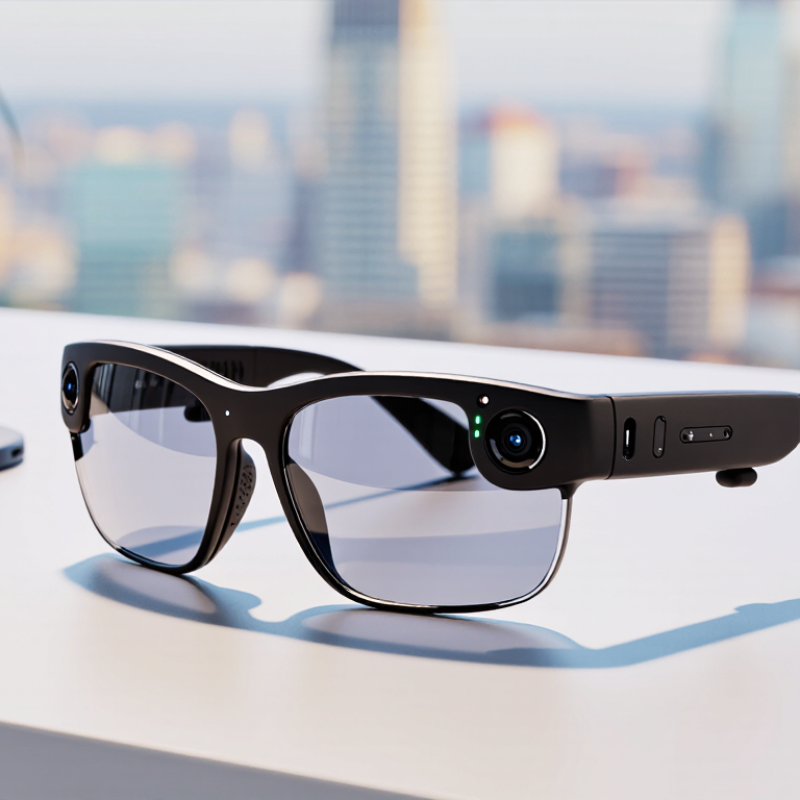
What Are Smart Glasses With Cameras?
Smart glasses with cameras are wearable glasses that capture photos or video through a small built-in lens. They may also include microphones, speakers, wireless connections, and voice controls. Unlike ordinary glasses, they combine a familiar frame with hands-free digital functions.
A camera indicator light can show when recording is active. Some models also provide live viewing, image sharing, or simple visual assistance.
In daily use, these glasses can document a bicycle route, record a cooking demonstration, or help someone remember a repair process. The camera usually works through a connected phone application. Battery life, storage, image quality, and comfort matter more than impressive specifications. A heavy frame becomes irritating after an hour. Small lenses may also struggle in dim rooms or bright backlight.
Privacy requires careful judgment.
Ask before recording people, especially in private spaces. Follow local recording and data-protection rules. Keep captured files secure, because cloud storage is not automatically harmless. I have found that voice controls can be convenient, but background noise often causes mistakes. That weakness matters. Camera glasses are useful tools, not invisible replacements for phones or professional cameras. Their best role depends on transparent use, realistic expectations, and respectful habits.
How Camera Features Work in Smart Glasses
Camera smart glasses combine a miniature camera, image sensor, processor, microphone, and wireless connection inside a lightweight frame. The sensor captures light through a tiny lens, then converts it into digital images or short video clips. A built-in processor reduces file size before sending content to a phone or secure cloud service. Battery capacity remains a practical limit. Continuous recording can create heat and drain power quickly.
Counterpoint Research reported 210% year-over-year growth in global smart glasses shipments during the first quarter of 2025. That surge reflects stronger consumer interest in hands-free photography and voice-controlled assistance. IDC’s Worldwide Quarterly Wearable Device Tracker recorded about 537 million wearable devices shipped in 2024. Smart glasses remain a small part of that category, but their camera functions are becoming more visible.
A front-facing indicator light can show when recording is active. However, bright sunlight, motion, and poor positioning can reduce image quality. I have found that a camera aligned slightly above eye level may miss close objects. Audio commands can also fail in crowded streets. That is easy to overlook. Users should review storage controls, permission settings, and automatic upload options before daily use. Independent testing should examine battery endurance, image stabilization, microphone clarity, and privacy signals rather than relying only on advertised resolution.
What Are the Top Smart Glasses With Camera?
How Camera Features Work in Smart Glasses
Camera performance in smart glasses depends on resolution, lens field of view, image stabilization, processing power, storage, and battery capacity. Higher video resolution captures more pixels per frame, which can improve detail but generally requires more processing, storage, and energy. For example, a 4K frame contains four times as many pixels as a 1080p frame.
Key Factors for Comparing Camera Smart Glasses
The top camera smart glasses are not chosen by image quality alone. Compare the camera’s resolution, field of view, stabilization, and performance in changing light. A wide lens captures more of a room, but it may bend faces near the edges. Stabilization matters when walking through a market or cycling on a quiet path. Check whether videos look natural at arm’s length. Some models promise sharp footage, yet indoor clips can appear soft and noisy. Real-world testing exposes that gap.
Battery life should be measured with recording, calls, and audio active. A small battery may last all day in standby, but only a short session under constant capture. Storage is another practical detail. Confirm transfer speed, file limits, and whether footage depends on a phone connection. Controls should work without hunting for a tiny button. Voice commands can help, though crowded streets and strong wind may reduce accuracy. Test them in your own routine.
Comfort affects use more than a specification sheet suggests. Check frame weight, nose-pad pressure, heat near the temples, and lens clarity after an hour. A visible recording indicator supports informed consent, but it is not perfect. Ask before recording people in private settings, and respect local rules. Water resistance, hinge strength, repair options, update support, and warranty terms reveal long-term reliability. I would also inspect sample files frame by frame. A clever feature can still feel unfinished.
Top Smart Glasses With Cameras by Use Case
For commuting and travel, smart glasses with cameras work best when they stay light and discreet. A wide-angle camera can capture a street sign, train platform, or quick walking clip without reaching for a phone. Look for image stabilization, voice controls, and enough battery for several hours. In my experience, clear audio matters as much as camera quality when traffic is loud. Privacy still matters. Always ask before recording people nearby.
For outdoor activities, choose glasses with a secure frame, water resistance, and a camera that handles changing sunlight. Cyclists may value hands-free route notes, while hikers may prefer short first-person clips of narrow trails or changing weather. A physical recording light builds trust. Bright scenes can still produce harsh shadows. That flaw is easy to miss in a showroom.
For work and learning, camera glasses can support visual notes, remote assistance, and quick reference images. A technician might photograph a control panel while keeping both hands available. A student could record a museum detail for later study, where permission allows it. In these cases, strong microphones and reliable file transfer are more useful than ultra-high resolution. Test the companion app before buying. It may feel clumsy.
For everyday accessibility, voice commands and spoken feedback can help users identify signs, read labels, or document surroundings. Choose adjustable text size, responsive controls, and a frame that remains comfortable after an hour. Battery estimates are often optimistic. Plan for charging. Camera glasses are useful tools, but they are not substitutes for careful judgment, consent, or professional equipment.
What Are the Top Smart Glasses With Camera? - Top Smart Glasses With Cameras by Use Case
| Use Case |
Camera Configuration |
Photo and Video Output |
Typical Battery Life |
Approx. Weight |
Protection Rating |
Key Strength |
| Everyday photos and short videos |
Single 12 MP wide-angle camera |
Photos up to 3,024 × 4,032 pixels; video up to 1,920 × 1,440 pixels at 30 fps |
Up to approximately 4 hours of mixed use |
About 130–135 g, including the frame and electronics |
Typically IPX4 splash resistance |
Natural first-person capture without holding a phone |
| Hands-free calls and voice assistance |
12 MP camera with a multi-microphone audio array |
1080p-class video at 30 fps; still-image capture; stereo speakers for calls |
Approximately 4–8 hours, depending on generation and usage |
About 130–140 g |
Usually IPX4; not designed for swimming or heavy rain |
Open-ear audio keeps users aware of surrounding sounds |
| Travel, walking, and point-of-view documentation |
12 MP camera with electronic image stabilization |
Up to 3K video at 30 fps on newer configurations; high-resolution still photos |
Up to approximately 8 hours for newer versions; less with frequent recording |
About 130–140 g |
Commonly IPX4 splash resistance |
Improved stabilization and longer operating time for day trips |
| Immersive augmented-reality capture |
Two 5 MP cameras for stereoscopic scene capture |
Square-format stereoscopic video at approximately 1,216 × 1,216 pixels and 30 fps |
Around 4 hours per charge under typical use |
About 130–135 g |
Water resistance varies; avoid submersion |
Creates depth-aware content for compatible AR viewing experiences |
| Remote assistance and field service |
8 MP camera with autofocus and a small monocular display |
Video recording and live streaming up to 1,920 × 1,080 pixels |
Up to approximately 8–12 hours for light use; continuous streaming reduces runtime |
About 90–95 g |
Model-dependent; many versions are intended for indoor or controlled environments |
Technicians can share a live view while keeping both hands free |
| Experimental social and creative content |
Dual 5 MP cameras with spatial or stereoscopic capture |
Typically 1,216 × 1,216-pixel video at 30 fps, with depth-oriented playback |
Approximately 2–4 hours, depending on display and camera activity |
About 130–140 g |
Generally splash-resistant rather than waterproof |
Best suited to testing spatial storytelling and emerging AR formats |
Note: Battery life, recording limits, image formats, and protection ratings can vary by frame size, firmware version, temperature, connectivity, and the amount of camera or audio use.
Privacy, Safety, and Legal Considerations
When comparing top smart glasses with cameras, privacy deserves equal attention to image quality. In practical use, a tiny recording light can be difficult to notice in a crowded café. Choose glasses with a clear, visible recording indicator and a physical camera switch when available. Avoid recording private conversations, changing rooms, medical visits, or children without permission. Store footage securely, limit cloud access, and delete clips you no longer need. These habits reduce exposure if the glasses are lost or hacked.
Tips: Ask before recording people. Keep the camera pointed down when entering private spaces. Check who can access saved videos. Review privacy settings before wearing the glasses outdoors. Simple steps help.
Recording laws differ by country, region, and situation. Some areas require consent from everyone in a conversation. Others regulate audio more strictly than video. Public visibility does not always remove privacy expectations. Check current local rules before recording, especially at work, schools, hospitals, events, or transportation facilities. Do not rely only on a device’s default settings. They may be confusing or incomplete. I still find privacy decisions uncomfortable in busy public places. A quick pause can prevent an avoidable mistake. When unsure, do not record.
FAQS
They are wearable glasses with a small camera, microphones, speakers, and wireless connections. They capture photos or short videos without holding a phone. Some models offer voice controls and simple visual assistance. They remain glasses, not magic.
Users can record bicycle routes, cooking demonstrations, or repair steps. A traveler might capture a train platform sign hands-free. A technician could photograph a control panel while using both hands. The connected phone application usually manages files and settings.
Comfort, battery life, storage, image quality, and reliable file transfer matter most. A secure frame helps during cycling or hiking. Image stabilization helps with walking clips. Strong microphones matter near traffic. Specifications can distract.
They can work well for cycling, hiking, and changing weather conditions. Choose a secure frame and useful water resistance. The camera should handle sunlight and deep shadows. Bright scenes may still look harsh. Test them outside first.
They can provide visual notes, remote assistance, and quick reference images. A learner might record a permitted museum detail for later study. Strong microphones may help more than extremely high resolution. Test the companion application before purchasing. It may feel clumsy.
Voice commands and spoken feedback may help users identify signs or read labels. Adjustable text size and responsive controls can improve daily use. The frame should remain comfortable after an hour. Battery estimates may be optimistic. Plan for charging.
Ask before recording people, especially inside private spaces. Follow local recording and data-protection requirements. Keep captured files secure on the device and connected services. A recording indicator light can build trust. It is not enough alone.
Small lenses may struggle in dim rooms or bright backlight. Background noise can cause voice-command mistakes. Heavy frames may irritate the face after an hour. Cloud storage is not automatically harmless. These glasses supplement phones and professional equipment, rather than replacing them.
Conclusion
Smart Glasses with Camera combine wearable eyewear with a small built-in camera, allowing users to capture images, record short videos, recognize visual information, and sometimes access hands-free assistance. This article explains how camera features work, including image capture, voice or touch controls, wireless connections, storage, and battery use. It also examines key factors for comparison, such as camera quality, audio performance, comfort, durability, privacy indicators, software functions, and overall value.
The guide compares the best Smart Glasses with Camera by use case, including everyday photography, travel, work support, accessibility, and active lifestyles. It also highlights responsible use, emphasizing clear consent before recording, awareness of personal privacy, secure handling of captured content, and compliance with local rules in public or private spaces. By considering both practical features and ethical responsibilities, readers can choose camera-equipped smart glasses that suit their needs while using them safely and respectfully.